LingBot-Map: Geometric Context Transformer for Streaming 3D Reconstruction
Robbyant Team
[](https://arxiv.org/abs/2604.14141)
[](lingbot-map_paper.pdf)
[](https://technology.robbyant.com/lingbot-map)
[](https://huggingface.co/robbyant/lingbot-map)
[](https://www.modelscope.cn/models/Robbyant/lingbot-map)
[](LICENSE.txt)
https://github.com/user-attachments/assets/fe39e095-af2c-4ec9-b68d-a8ba97e505ab
-----
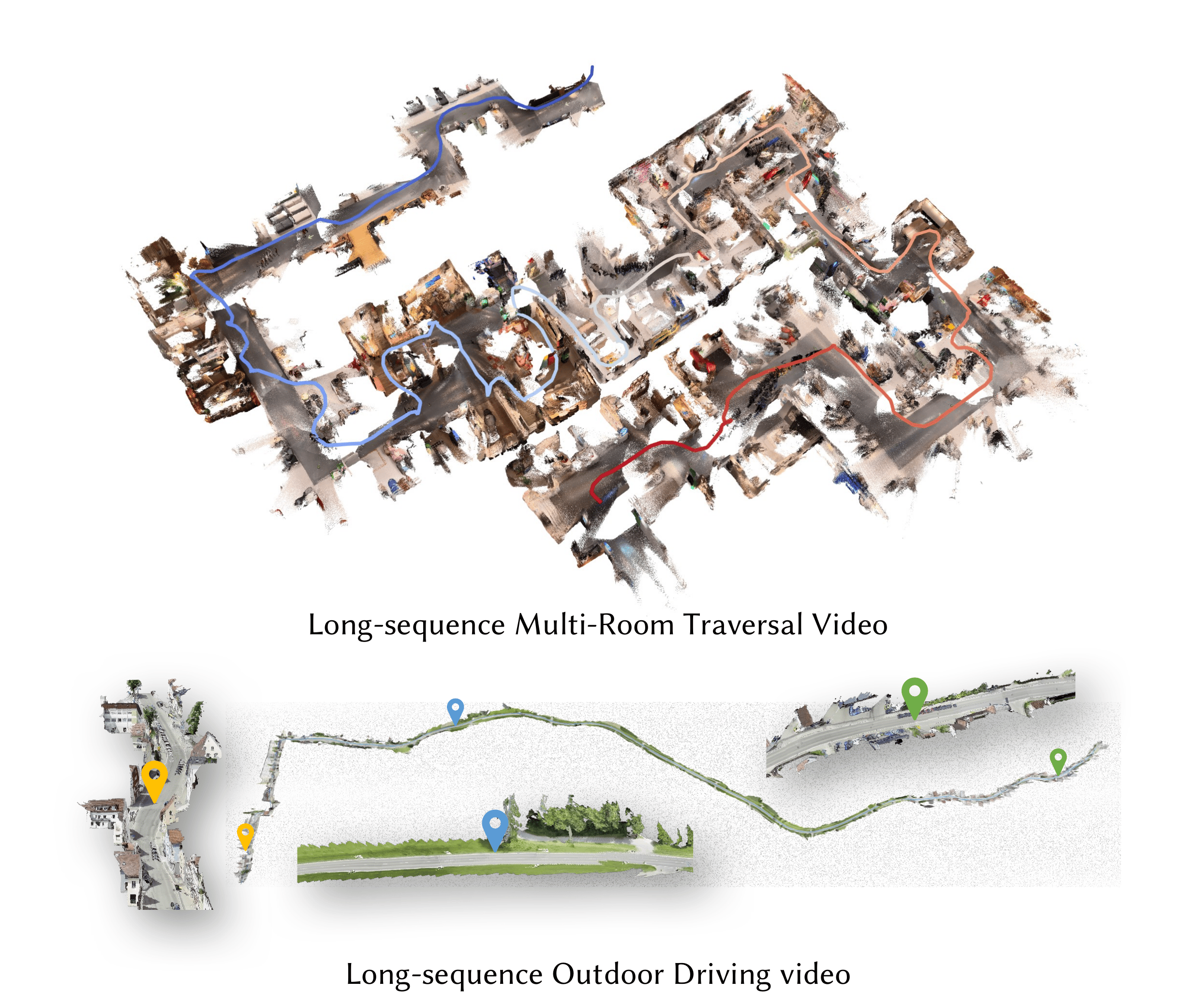
### 🗺️ Meet LingBot-Map! We've built a feed-forward 3D foundation model for streaming 3D reconstruction! 🏗️🌍
LingBot-Map has focused on:
- **Geometric Context Transformer**: Architecturally unifies coordinate grounding, dense geometric cues, and long-range drift correction within a single streaming framework through anchor context, pose-reference window, and trajectory memory.
- **High-Efficiency Streaming Inference**: A feed-forward architecture with paged KV cache attention, enabling stable inference at ~20 FPS on 518×378 resolution over long sequences exceeding 10,000 frames.
- **State-of-the-Art Reconstruction**: Superior performance on diverse benchmarks compared to both existing streaming and iterative optimization-based approaches.
---
# ⚙️ Quick Start
## Installation
**1. Create conda environment**
```bash
conda create -n lingbot-map python=3.10 -y
conda activate lingbot-map
```
**2. Install PyTorch (CUDA 12.8)**
```bash
pip install torch==2.9.1 torchvision==0.24.1 --index-url https://download.pytorch.org/whl/cu128
```
> For other CUDA versions, see [PyTorch Get Started](https://pytorch.org/get-started/locally/).
**3. Install lingbot-map**
```bash
pip install -e .
```
**4. Install FlashInfer (recommended)**
FlashInfer provides paged KV cache attention for efficient streaming inference:
```bash
# CUDA 12.8 + PyTorch 2.9
pip install flashinfer-python -i https://flashinfer.ai/whl/cu128/torch2.9/
```
> For other CUDA/PyTorch combinations, see [FlashInfer installation](https://docs.flashinfer.ai/installation.html).
> If FlashInfer is not installed, the model falls back to SDPA (PyTorch native attention) via `--use_sdpa`.
**5. Visualization dependencies (optional)**
```bash
pip install -e ".[vis]"
```
# 📦 Model Download
| Model Name | Huggingface Repository | ModelScope Repository | Description |
| :--- | :--- | :--- | :--- |
| lingbot-map | [robbyant/lingbot-map](https://huggingface.co/robbyant/lingbot-map) | [Robbyant/lingbot-map](https://www.modelscope.cn/models/Robbyant/lingbot-map) | Base model checkpoint (4.63 GB) |
# 🎬 Demo
Run `demo.py` for interactive 3D visualization via a browser-based [viser](https://github.com/nerfstudio-project/viser) viewer (default `http://localhost:8080`).
### Try the Example Scenes
We provide three example scenes in `example/` that you can run out of the box:
```bash
# Church scene
python demo.py --model_path /path/to/checkpoint.pt \
--image_folder example/church --mask_sky
# Oxford scene with sky masking (outdoor)
python demo.py --model_path /path/to/checkpoint.pt \
--image_folder example/oxford --mask_sky
# University scene
python demo.py --model_path /path/to/checkpoint.pt \
--image_folder example/university4 --mask_sky
```
### Streaming Inference from Images
```bash
python demo.py --model_path /path/to/checkpoint.pt \
--image_folder /path/to/images/
```
### Streaming Inference from Video
```bash
python demo.py --model_path /path/to/checkpoint.pt \
--video_path video.mp4 --fps 10
```
### Streaming with Keyframe Interval
Use `--keyframe_interval` to reduce KV cache memory by only keeping every N-th frame as a keyframe. Non-keyframe frames still produce predictions but are not stored in the cache. This is useful for long sequences which exceed 320 frames.
```bash
python demo.py --model_path /path/to/checkpoint.pt \
--image_folder /path/to/images/ --keyframe_interval 6
```
### Windowed Inference (for long sequences, >3000 frames)
```bash
python demo.py --model_path /path/to/checkpoint.pt \
--video_path video.mp4 --fps 10 \
--mode windowed --window_size 64
```
### Sky Masking
Sky masking uses an ONNX sky segmentation model to filter out sky points from the reconstructed point cloud, which improves visualization quality for outdoor scenes.
**Setup:**
```bash
# Install onnxruntime (required)
pip install onnxruntime # CPU
# or
pip install onnxruntime-gpu # GPU (faster for large image sets)
```
The sky segmentation model (`skyseg.onnx`) will be automatically downloaded from [HuggingFace](https://huggingface.co/JianyuanWang/skyseg/resolve/main/skyseg.onnx) on first use.
**Usage:**
```bash
python demo.py --model_path /path/to/checkpoint.pt \
--image_folder /path/to/images/ --mask_sky
```
Sky masks are cached in `_sky_masks/` so subsequent runs skip regeneration. You can also specify a custom cache directory with `--sky_mask_dir`, or save side-by-side mask visualizations with `--sky_mask_visualization_dir`:
```bash
python demo.py --model_path /path/to/checkpoint.pt \
--image_folder /path/to/images/ --mask_sky \
--sky_mask_dir /path/to/cached_masks/ \
--sky_mask_visualization_dir /path/to/mask_viz/
```
### Visualization Options
| Argument | Default | Description |
|:---|:---|:---|
| `--port` | `8080` | Viser viewer port |
| `--conf_threshold` | `1.5` | Visibility threshold for filtering low-confidence points |
| `--point_size` | `0.00001` | Point cloud point size |
| `--downsample_factor` | `10` | Spatial downsampling for point cloud display |
### Without FlashInfer (SDPA fallback)
```bash
python demo.py --model_path /path/to/checkpoint.pt \
--image_folder /path/to/images/ --use_sdpa
```
# 📜 License
This project is released under the Apache License 2.0. See [LICENSE](LICENSE.txt) file for details.
# 📖 Citation
```bibtex
@article{chen2026geometric,
title={Geometric Context Transformer for Streaming 3D Reconstruction},
author={Chen, Lin-Zhuo and Gao, Jian and Chen, Yihang and Cheng, Ka Leong and Sun, Yipengjing and Hu, Liangxiao and Xue, Nan and Zhu, Xing and Shen, Yujun and Yao, Yao and Xu, Yinghao},
journal={arXiv preprint arXiv:2604.14141},
year={2026}
}
```
# ✨ Acknowledgments
We thank Shangzhan Zhang, Jianyuan Wang, Yudong Jin, Christian Rupprecht, and Xun Cao for their helpful discussions and support.
This work builds upon several excellent open-source projects:
- [VGGT](https://github.com/facebookresearch/vggt)
- [DINOv2](https://github.com/facebookresearch/dinov2)
- [Flashinfer](https://github.com/flashinfer-ai/flashinfer)
---